Automation for Small Businesses in Israel (2026): What to Automate First, Which Tools, What It Costs
By Daniel Mashkov, AI Systems ArchitectPublished Updated 12 min read
TL;DR
Automation for a small business means a system doing the steps your team repeats by hand. Start with the handoffs that leak time or deals every week: capturing leads from WhatsApp and forms, following up, issuing invoices and receipts, booking and reminders, and a weekly report. Make, n8n and Zapier cover most of it without custom code, and each has a free way to start. Add AI only where a fixed rule is not enough, and plan for privacy from day one.
What automation options does a small business have?
Business automation means a system doing a step your team now does by hand, every time the same thing happens: a message arrives, a quote is accepted, a payment clears. In a small Israeli business, six areas repay the effort almost everywhere, roughly in this order:
- Lead capture: every WhatsApp message, website form and Facebook lead lands in one list (a CRM, or a simple Airtable or Google Sheets table) and gets an instant acknowledgement.
- Follow-ups: quotes nobody answered, unpaid invoices and abandoned carts get a reminder on a schedule, not when someone remembers.
- Invoices and receipts: a paid order or an accepted quote issues the document from your invoicing system — Morning (Green Invoice), iCount or your payment provider — and emails it to the customer.
- Scheduling: customers book a free slot themselves, and a reminder goes out the day before by WhatsApp, SMS or email.
- Reporting: one weekly summary of leads, sales and open invoices instead of three dashboards nobody opens.
- Routine replies: answers to the ten questions customers ask every day, with anything unusual handed to a person.
What an automation pipeline looks like
Trigger
WhatsApp / form / email
AI layer
understands intent
Route
Make.com / n8n
CRM + action
logged, replied, booked
What are automation systems?
An automation system is software that waits for an event (the trigger) and then runs a fixed series of steps (the actions) in your other tools. A submitted form is a trigger; "create a contact in the CRM, send a WhatsApp message, alert the owner" are actions. There are three kinds, and most small businesses end up using two of them.
- Integration platforms — Make, Zapier and n8n. They connect tools that do not talk to each other, in a visual editor, without code. Most small-business automation lives here.
- Automation already built into tools you pay for — the greeting and away messages in the WhatsApp Business app, the reminders in your booking tool, recurring invoices in your invoicing system, the automations inside monday.com or Pipedrive. Check these first: they are already paid for, and there is no connection between two tools that can break.
- Custom code and AI agents — for logic no platform covers: reading a free-text message and working out what the customer wants, syncing with an old ERP, or a process full of exceptions. Powerful, but someone has to own and maintain it.
Where Israeli businesses stand in 2026
Adoption is moving fast. In the Central Bureau of Statistics business survey, 39% of Israeli businesses reported using AI in March 2026, up from 28% in June 2025 (as reported by Bizportal in April 2026). But drafting an email in a chatbot is not the same as automating a process, and the survey counts any use of AI. In a small business the gains come from the dull part: the handoffs between tools that someone still does by hand.
Start with leads: speed decides who gets the job
The strongest evidence here is old but consistent. A Harvard Business Review study of US companies found that firms that tried to contact a lead within an hour were "nearly seven times as likely to qualify the lead" as firms that waited even one more hour, and more than 60 times as likely as those that waited 24 hours or longer (Oldroyd, McElheran and Elkington, 2011). A small business cannot answer every inquiry within the hour by hand. An automation can at least acknowledge it, collect the details and alert the right person.
In practice: WhatsApp messages, website forms and Facebook lead ads all feed one table. Each new lead gets an immediate reply ("got it, here is what happens next"), is tagged by source, and sends an alert to your phone. Duplicates are merged by phone number — in Israel the same customer often writes on WhatsApp and fills in the form too.
Follow-ups, invoices and receipts, the Israeli way
Follow-up is the cheapest win: a quote with no answer after two days gets a polite nudge, an unpaid invoice gets a reminder after a week, and the owner sees a list of what is stuck instead of carrying it in their head.
For invoices, never generate the document yourself — let the invoicing system issue it. Morning (Green Invoice) publishes a REST API for documents, clients and payments, with a sandbox for testing, and Grow issues invoices and receipts inside its payment plans. This matters more in 2026 because of the Tax Authority's Israel Invoice model: from 1 June 2026, a tax invoice above ₪5,000 before VAT needs an allocation number, and without it your business customer cannot deduct the VAT. Morning, for example, requests the number automatically for the invoices that need one. A homemade PDF skips that step.
Scheduling and reminders
If customers book appointments with you, a booking page that shows only genuinely free slots removes the back-and-forth, and a reminder the day before cuts the "I forgot" no-shows. On WhatsApp that reminder is a template message sent outside the 24-hour customer service window, so Meta charges for it (details in the WhatsApp section below); an SMS or email reminder is the alternative. Put a one-tap way to reschedule in the reminder — a cancellation you hear about a day early is a slot you can still fill.
Reporting, and where AI actually helps
The dashboard you never build because it is tedious is the easiest automation to justify. A scheduled flow pulls leads, sales and open invoices from your store, ads and CRM into one weekly summary by email or WhatsApp — the same pattern behind the AI agent that runs my own business operations end to end.
AI earns a place only where a fixed rule is not enough: understanding a free-text WhatsApp message ("can you come Thursday, the leak is under the sink"), drafting a first reply for a person to approve, summarizing a long email thread, or writing the first draft of product descriptions and posts in Hebrew and English that you then edit for voice and accuracy. Everything else — moving data, sending reminders, issuing documents — is cheaper and more predictable as plain automation.
Choosing a tool: Make, n8n or Zapier
All three do the same basic job — a trigger, then actions — and all three let you prove a flow before you pay: Zapier and Make have a free plan, and n8n is free to run on your own server. They differ in how they bill, where they run and how much they ask of you. The prices below are the vendors' own published list prices, checked on 3 October 2026.
- Zapier: the largest app catalog and the easiest start. Free: 100 tasks a month, checking for new data every 15 minutes. Professional costs $19.99 a month billed yearly ($29.99 billed monthly) for 750 tasks, and every action that runs counts as a task, so a busy flow gets expensive.
- Make: more flexible logic (branches, loops, error routes) at a lower price per step. Free: 1,000 credits a month with a 15-minute minimum interval. The Core plan is listed from $9 a month for 10,000 credits, with a 1-minute interval.
- n8n: the code is public, under n8n's own Sustainable Use License. The Community Edition is free to self-host on your own server for your business's internal use — you pay for the server and the upkeep. n8n Cloud Starter costs €20 a month billed yearly for 2,500 workflow executions.
Which one to pick
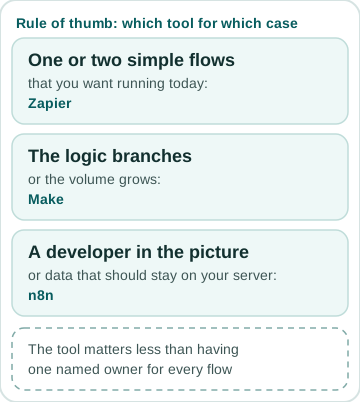
My rule of thumb: Zapier for one or two simple flows you want running today, Make once the logic branches or the volume grows, and n8n when there is a developer in the picture or the data should not leave a server you control. The tool matters less than having one named owner for every flow. The longer comparison, with five worked workflows, is in my n8n and Make guide.
WhatsApp: the Business app or the Business Platform (API)
The free WhatsApp Business app already automates the basics for one phone: a greeting message, an away message outside working hours, and quick replies. It does not connect to your CRM or run a bot. For that you need the WhatsApp Business Platform (the API), which you reach through a provider — an Israeli one such as Connectop, or an international one — or directly through Meta.
Since 1 July 2025 Meta bills per message, not per conversation. That changed again on 1 October 2026: in Meta's pricing documentation, "Effective October 1, 2026, Meta will charge on a per-message basis for service messages" — so replies inside the 24-hour customer service window, free until then, are now billed per message too, as are utility templates (an order update, a reminder) sent in response inside that window. Marketing templates are always charged, and rates depend on the recipient's country. The provider adds its own plan on top: Connectop, for example, lists plans from ₪299 a month before VAT, a basic setup fee of ₪2,400, and Meta's message fees billed separately (checked October 2026). My guide to WhatsApp bots for Israeli businesses covers what a bot adds on top of that.
What automation costs depend on
There is no honest single price for "automation", because the bill has two parts that move independently. The build — setting up the flows — depends on:
- How many tools each flow touches: form to CRM is one hop; WhatsApp to CRM to invoicing to payment is four, each with its own login, limits and ways to fail.
- How clean your data is: duplicate contacts, phone numbers typed every which way and three spellings of the same product take more work than the flow itself.
- Whether a step needs AI: reading free text or drafting replies adds testing, safeguards and a usage bill from the AI provider.
- Exceptions: every "except when…" in your process is another branch to build and test.
The running costs
The running costs are the subscriptions: the automation platform (from free to a few tens of dollars a month at small-business volume, more at high volume), the WhatsApp provider plan and Meta's message fees, AI usage, and your CRM or invoicing plan. Ask for both numbers before you start. I give every project a fixed quote after a short call and say up front which subscriptions you will pay the vendors directly. For what to put in order before any of this, read whether your business is ready to automate.
Risk one: privacy
Automation copies personal data between systems, so it falls squarely under Israel's Protection of Privacy Law. Amendment 13 took effect on 14 August 2025 and gave the Privacy Protection Authority the power to impose monetary sanctions, alongside new duties such as appointing a privacy protection officer in defined cases. This is not legal advice, but the basics apply to any small business that automates:
- Collect only what the flow needs, and say in your privacy notice what you do with the data and which services process it.
- Know where each tool stores data. Make, Zapier and n8n Cloud run on their own servers outside Israel; a self-hosted n8n keeps the data on a server you choose.
- Give each automation its own account or API key with the minimum permissions, and revoke access when someone leaves.
- Do not paste customer data into a public AI chat; use an API account whose terms say your data is not used for training.
Risk two: reliability
Reliability is the other risk, and it is quieter. A flow breaks when a password changes, an app updates its API or a field is renamed — and it breaks silently unless it was built for that. Every flow I build has error alerts that reach a real person, retries for temporary failures, a log you can read and a named owner. Free tiers also check for new data only every 15 minutes: fine for a weekly report, too slow for a hot lead.
A worked example: a two-person renovation business
An illustrative setup for a small renovation business that gets most of its inquiries on WhatsApp — built on tools a small business already has, with one integration platform in the middle:
- 1. A customer writes on WhatsApp. The number is connected to the Business Platform through a provider, so the reply goes out as a service message inside the 24-hour window — free until 1 October 2026, billed per message by Meta since then.
- 2. An automatic reply asks three questions: the area, the type of job and a photo. The answers land as a new row in Airtable, tagged "WhatsApp".
- 3. The owner gets a phone alert with a summary and a link to the row. The website form feeds the same table.
- 4. After the site visit he sends a quote from Morning. If there is no answer in two days, a reminder goes out, and the quote status updates in the table.
- 5. When the customer approves, Morning issues the tax invoice (with an allocation number when the amount calls for one) and a payment link; a paid invoice closes the row.
- 6. Every Sunday morning a summary arrives: new leads by source, open quotes and unpaid invoices.
Why the example has no AI in it
Nothing here needs custom code or AI. If the owner later wants the bot to understand free-text messages and sort urgent jobs from routine ones, that is the point to add an AI step — on top of a flow that already works.
Where to start this week
Write down the three handoffs that cost you the most time or deals each week, pick the one that happens most often, and automate only that — on the free tier of one platform, or inside a tool you already pay for. Run it for two weeks, fix what breaks, then add the next one. Not sure the process is ready? The AI automation readiness check is eight questions. If you would rather have it built properly from the start, with someone who owns it, that is what my AI agents and automation service for small businesses is for.
Zapier vs Make vs n8n for a small business — published prices, checked 3 October 2026
| Factor | Zapier | Make | n8n |
|---|---|---|---|
| Free tier | 100 tasks a month, checks every 15 minutes | 1,000 credits a month, 15-minute minimum interval | Community Edition, free to self-host |
| Entry paid plan | Professional: $19.99 a month billed yearly ($29.99 monthly), 750 tasks | Core: from $9 a month, 10,000 credits | Cloud Starter: €20 a month billed yearly, 2,500 executions |
| What you are billed for | Tasks — each action that runs | Credits — each step that runs | Executions — one whole workflow run |
| Where it runs | Zapier's cloud | Make's cloud | n8n Cloud or your own server |
| Best for | One or two simple flows, running today | Branching logic and growing volume | A developer on hand, or data that stays on your server |
FAQ
What automation options does a small business have?
The main ones: capturing leads from WhatsApp and forms into one list with an instant reply; follow-up reminders for quotes and unpaid invoices; invoices and receipts issued automatically by your invoicing system; self-service booking with reminders; routine replies to common questions; and a weekly report. Start with whichever costs you the most time or deals each week.
What are automation systems?
Software that runs a fixed series of steps in your tools whenever a trigger happens — a form is sent, a payment clears. For a small business that usually means an integration platform (Make, Zapier or n8n), the automations built into tools you already use (WhatsApp Business, your CRM, your invoicing system) and, for the harder cases, custom code or an AI agent.
Do I need a developer to start?
No. The first automation usually runs on tools like Make or n8n wired to your existing CRM and email — no custom code. Custom AI agents come later, once a workflow proves its value.
Which is better for a small business: Make, n8n or Zapier?
Zapier is the quickest start for one or two simple flows. Make handles branching logic at a lower price per step once volume grows. n8n suits a business with a developer, or one that wants the data on its own server — its Community Edition is free to self-host. Zapier and Make have a free plan too, so prove the flow before you pay.
How much does automation cost a small business?
Two parts. The build depends on how many tools each flow touches, how clean your data is, whether a step needs AI, and how many exceptions the process has. The running cost is subscriptions: an automation platform (free tiers exist; Zapier Professional is $19.99 a month billed yearly, Make Core is listed from $9, n8n Cloud Starter is €20 billed yearly — checked October 2026), plus WhatsApp and AI usage if you use them.
Sources
- Bizportal — CBS business survey: 39% of Israeli businesses used AI in March 2026, 28% in June 2025 (28 April 2026)
- Central Bureau of Statistics — Business Tendency Survey, March 2026
- Harvard Business Review — The Short Life of Online Sales Leads (Oldroyd, McElheran, Elkington, March 2011)
- Zapier — pricing (checked 2026-10-03)
- Make — pricing (checked 2026-10-03)
- n8n — pricing and Community Edition (checked 2026-10-03)
- n8n — Sustainable Use License (checked 2026-10-03)
- Meta — WhatsApp Business Platform pricing (per-message since 1 July 2025; checked 2026-10-03)
- Meta — charging for service and utility messages from 1 October 2026 (checked 2026-10-03)
- Connectop — WhatsApp platform pricing (checked 2026-10-03)
- Morning (Green Invoice) — developer API (checked 2026-10-03)
- Morning — the Israel Invoice model and allocation numbers (checked 2026-10-03)
- Grow — published fees and documents (checked 2026-10-03)
- IAPP — Israel's Amendment 13 to the Protection of Privacy Law takes effect (August 2025; checked 2026-10-03)
- n8n — workflow automation
- Make — automation platform