WhatsApp Bot for Business in Israel: What It Does, What It Costs, and Who Should Build One
By Daniel Mashkov, AI Systems ArchitectPublished Updated 9 min read
TL;DR
WhatsApp is the one channel almost every Israeli customer already uses: 99% of Israeli adults, according to the Israel Internet Association's July 2025 survey. An AI bot (not a scripted one) understands what a customer is asking for and hands anything complex to a person. The clearest fits are clinics (appointment reminders and rescheduling — in a systematic review of 29 studies, SMS and phone reminders cut missed appointments by about a third on average), service contractors (collecting the address, photos and urgency before anyone calls back) and online stores (order-status and shipping questions answered around the clock). The cost depends on scope, integrations, AI and message volume — plus Meta's per-message fees, which from 1 October 2026 also apply to replies inside the 24-hour customer service window.
Why WhatsApp, Not SMS or Phone
WhatsApp is where Israeli customers already are. The Israel Internet Association's survey of a representative sample of Israeli adults (July 2025) puts WhatsApp at 99% usage — the most-used digital platform in the country, ahead of YouTube at 97% — and at 98% in Arab society, where 99% of users open it every day. That makes it the channel customers expect to reach you on. It is also a conversation, not a broadcast: customers answer in their own words, send a photo of the leak or a screenshot of the order, share a location or a voice note, and pick the thread up hours later where they left off. A phone call needs someone free to answer it; most businesses use SMS only to send. An AI bot on WhatsApp handles the routine part of those conversations — opening hours, appointment requests, order status — and passes the rest to a person with the context already written down.
What an automation pipeline looks like
Trigger
WhatsApp / form / email
AI layer
understands intent
Route
Make.com / n8n
CRM + action
logged, replied, booked
AI vs. Scripted Bots: The Critical Difference
A scripted bot — the classic menu-and-keyword flow — responds to keywords: if message contains "appointment," reply with the appointment form. Useful for simple flows, but customers quickly get frustrated when their question does not match a keyword. An AI bot (built on a large language model) understands intent. Customer asks "I want to come in tomorrow at 10 but I have two kids" — a scripted bot misses the "I have kids" context; an AI bot understands "customer may need childcare options" and routes differently.
Use Case 1: Clinics — Reminders That Cut No-Shows
Missed appointments are an old, well-measured problem. A systematic review by Hasvold and Wootton (Journal of Telemedicine and Telecare, 2011) pooled 29 studies of telephone and SMS reminders for hospital appointments: median non-attendance was 23% without reminders and 13% with them, and the weighted average reduction was 34% of the baseline rate. Automated reminders did somewhat less than a person calling (29% versus 39%). Those were SMS and phone reminders, not WhatsApp — so read the review as evidence that reminders work, not as a promise of a specific number for your clinic. What a WhatsApp bot adds is the reply: it sends the reminder the day before, and when the patient answers "can we move it to Thursday?" it offers open slots from the calendar, rebooks, and frees the original slot for someone on the waiting list — or hands the conversation to the front desk when the request is not routine.
Use Case 2: Service Contractors — Intake Before the Callback
Plumbers, electricians and air-conditioning technicians lose working hours to the same intake questions on every call: "What's your address?" "When are you available?" "Is water coming through the ceiling right now?" An AI bot asks them on WhatsApp while the technician is on another job, collects photos of the problem, and tags the lead as urgent, routine or callback. Whoever calls back sees the address, the photos and the urgency before dialling, can quote or schedule on the first call, and the urgent jobs rise to the top instead of waiting in a voicemail box. How much time that saves depends on how many calls you take and how long intake takes today — time a week of calls before you build, so you can measure the difference after.
Use Case 3: Online Stores — Routine Questions Around the Clock
An Israeli online store hears the same questions every day: "Where is my order?" "Can I use my voucher?" "Do you ship to the Negev?" When the bot is connected to the store and the shipping company, it answers them from live order data — at night and on Shabbat too, when nobody on the team is online. Complaints, returns and special requests go to a person, with the order already attached. What share of messages the bot can close on its own depends on your mix: count a month of incoming messages by type before you build, and that tally is your realistic ceiling.
What Drives the Cost
Four things set the price of a WhatsApp bot: a ready-made platform with menus, or a bot built around your own systems; how many integrations it needs (calendar, CRM, store, shipping); whether it uses AI to understand free text, which adds the AI provider's usage fees; and how many messages it sends. For published market prices, the Israeli examples in the FAQ below — Connectop and Sound Check, checked October 2026 — are a fair reference point. The timeline follows the same drivers: a menu bot on an existing platform goes live quickly, a bot that reads your calendar or store takes longer, and before either one sends a message Meta has to verify the business and approve every template you plan to send.
What It Costs to Run Each Month
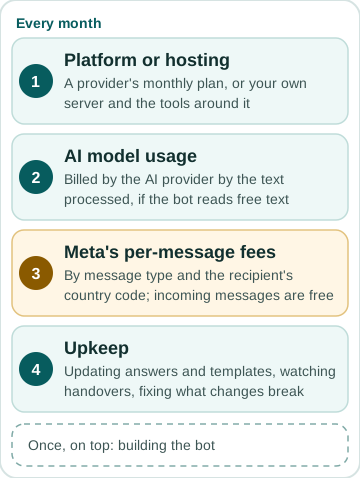
A running WhatsApp bot has four monthly cost layers, and only one of them is Meta's. The platform or hosting it runs on: a provider's monthly plan, or your own server and the tools around it. The AI model's usage, billed by the AI provider by the amount of text processed, if the bot understands free text. Meta's per-message fees. And upkeep: someone who updates answers and templates, watches the handovers to staff, and fixes what breaks when a connected system changes. The build is a one-off cost on top of these.
Meta's part follows its own rules. Since 1 July 2025 it charges per delivered message, not per conversation. The rate depends on the message category (marketing, utility or authentication) and on the country code of the recipient's number, and Meta publishes its rate cards by currency on its pricing page, so you can price your own message mix before you build. Higher monthly volumes unlock lower utility and authentication rates. Messages customers send to you are not charged.
The open question is your replies, because Meta's own pages disagree. The main pricing page, read on 3 October 2026, still says non-template messages and utility templates sent inside the 24-hour customer service window are free. A separate Meta page on non-template messages says that from 1 October 2026 Meta charges for service messages — any non-template reply not powered by Meta's own Business Agent, so replies typed by your staff and replies written by a third-party AI both count — at the same rate as utility and authentication messages in that market, with no volume tiers, and that utility templates inside the window were free only until that date. Replies powered by Meta's Business Agent are billed differently, per token: $2 per million tokens since 1 August 2026. Messages inside the 72-hour free entry point, which opens when a customer arrives from a Click to WhatsApp ad or a Facebook Page call-to-action button, stay free. Until the two pages agree, budget by the newer rule and check your first month's invoice.
To estimate your own number, count a month of conversations: how many customers write in, how many replies each one needs, and how many reminders or order updates you send outside the window. Multiply each category by Meta's rate for Israeli numbers, then add the platform plan, the AI usage and the hours of upkeep.
Whether it pays back is arithmetic on your own numbers, not an industry average: the appointments you lose to no-shows each month and what one is worth, or the hours your team spends on intake and what an hour costs — set against the build and the monthly running cost. Measure the before for a few weeks, so the after means something.
FAQ
How much does a WhatsApp bot cost?
It depends on four things: a ready-made platform or a bot built around your own systems, how many integrations it needs (CRM, calendar, store), whether it uses AI to understand free text, and how many messages you send. Two published Israeli examples, checked October 2026 and before VAT: Connectop lists platform plans from ₪299 a month with a basic setup fee of ₪2,400, and says typical implementations land between ₪7,000 and ₪20,000; Sound Check's price guide puts managed AI bots at roughly ₪2,400 to ₪12,000 or more to set up and ₪100 to ₪2,500 a month. Meta's per-message fees come on top: marketing templates are always charged, and from 1 October 2026 so are replies inside the 24-hour customer service window.
What is a business WhatsApp bot?
A program connected to your business WhatsApp number through the official WhatsApp Business Platform (the API) that answers customers automatically: it replies to common questions, collects details, books appointments or sends order updates, and hands anything complex to a person. A scripted bot follows buttons and keywords; an AI bot understands free-text messages. It is not the same as the free WhatsApp Business app, whose automation stops at greeting, away and quick-reply messages.
How do you create a dedicated chatbot?
Five steps. Write down the ten questions customers ask most and what a good answer looks like. Get access to the WhatsApp Business Platform through a provider or directly through Meta, verify the business number, and get the template messages you plan to send approved. Build the flow — a ready-made platform for menus and simple answers, or a custom AI agent built around your business when it has to understand free text and read your systems. Connect it to your CRM, calendar or store and decide exactly when it hands over to a person. Then test it with real messages, in Hebrew and English, before customers see it.
Will WhatsApp shut down my bot if I use it for business?
No, if done properly. WhatsApp Business API is the official channel for business bots. You register your bot through Meta's official API (not a third-party workaround). The bot sends messages only to customers who opt-in. No spam, no unsolicited messages, no selling phone lists. Handled correctly, you are working within WhatsApp's rules — though Meta enforces its own policies and can still limit a number that draws complaints or sends low-quality messages.
What if the bot says something wrong or mishandles a customer?
AI bots are not perfect. They hallucinate or make mistakes. The guardrail is human escalation: if the bot detects uncertainty, it escalates to a staff member. Also, you set thresholds: the bot only handles low-stakes conversations (order status, appointment reminders, FAQs). Anything financial, legal, or sensitive goes directly to a human. Liability is yours (you are the business), so build trust by showing customers when they are talking to a bot and always offering a "talk to a human" button.
Can the bot understand Hebrew and English in the same conversation?
Yes. Modern AI models handle code-switching (mixing languages) naturally. A customer can write "Hey, I need to reschedule my פגישה" and the bot understands both languages in the same message. This is especially useful in Israel where many business conversations mix Hebrew and English.
Sources
- Meta — getting opt-in for WhatsApp business messaging (checked October 2026)
- Meta — WhatsApp Business Platform pricing (per-message since 1 July 2025, rates by category and recipient country code, volume tiers, rate cards; still lists in-window replies as free; checked 2026-10-03)
- Connectop — WhatsApp platform pricing (checked 2026-10-03)
- Sound Check — chatbot price guide (checked 2026-10-03)
- Meta — pricing for non-template messages: service messages charged from 1 October 2026, no volume tiers; Meta Business Agent per token from 1 August 2026 (checked 2026-10-03)
- Israel Internet Association — social network and online service use in Israel, 2025 data (checked October 2026)
- Hasvold & Wootton (2011), Use of telephone and SMS reminders to improve attendance at hospital appointments: a systematic review, Journal of Telemedicine and Telecare (checked October 2026)
Related services
Related reading
May 2026 · 12 min
Automation for Small Businesses in Israel (2026): What to Automate First, Which Tools, What It Costs
May 2026 · 8 min
AI Automation Readiness for Israeli SMBs: Are You Ready to Automate?
May 2026 · 9 min
AI Automation for Your Business: What Actually Works (and What Gets Abandoned)
October 2026 · 16 min
An Online Booking System for a Service Business: Calendar Tool, Dedicated System, WordPress Plugin or Custom Build