The Hidden Cost of "Good Enough" WordPress Development
By Daniel Mashkov, AI Systems ArchitectPublished Updated 4 min read
TL;DR
A Deloitte study commissioned by Google found that a 0.1-second improvement in mobile site speed lifted retail conversions by 8.4%. Most WordPress performance problems are structural — poor code decisions, too many plugins, unoptimized images. Upgrading hosting rarely fixes them, yet most businesses pay to treat the symptom (a "slow server") instead of the cause (slow code).
Why does cheap development end up costing more?
A cheap WordPress build often ships with dozens of plugins installed without any review. Each one adds PHP, usually JavaScript and CSS too, and database queries of its own. Install the free Query Monitor plugin and open a page: on a bloated build, the query count is often several times what a lean build of the same page needs — and all of it runs before the browser has anything to show.
The hidden costs surface months later: a slow page drives visitors away, and visitors who leave don't buy. The Deloitte figure comes from 37 brands and does not scale linearly to your store, but the arithmetic is sobering anyway. For a store selling ₪50,000 a month, even a 2% dip in sales is ₪1,000 a month — ₪12,000 a year lost to a code decision made at the very start.
Add support costs on top. Cheap builds rarely document what was installed or why, so the next developer has to reverse-engineer the site before making even a simple change. A job that should take an afternoon ends up taking days.
Illustrative first year of a ₪3,500 build: where the money goes
What actually drives the cost of a WordPress build?
Plugin bloat. The PHP of every active plugin is loaded on every request — including pages where the plugin does nothing — and many plugins add their scripts and styles to every page as well. A common "budget" stack of WooCommerce, Yoast SEO, Elementor, WP Rocket and a handful of WooCommerce extensions is already a lot of code before the theme or any custom work. The question for each plugin is not "is it good?" but "does this site need it?"
Database bloat. Every page load pulls options, posts, metadata and user data from the database. Years of leftovers — options from plugins deleted long ago, expired transients, old post revisions — plus missing indexes turn queries that should take a few milliseconds into ones that take a noticeable fraction of a second. It feels like a server problem; it is a query problem.
Unoptimized images. A cheap developer uploads an 8 MB photo straight from the camera and moves on. A content image on a modern site usually needs somewhere between tens and a couple of hundred kilobytes, served as WebP or AVIF and sized to the space it fills. On a typical homepage, images are the heaviest resource type — about 40% of the bytes at the median, according to the HTTP Archive Web Almanac 2024 (on inner pages, JavaScript often overtakes them).
Why Hosting Won't Solve This
Most budget WordPress sites sit on shared hosting. The temptation is to "upgrade to a VPS", which typically multiplies the hosting bill. But if the code itself is inefficient, a faster server just runs slow code a little faster. The browser still has to download and run the same heavy page.
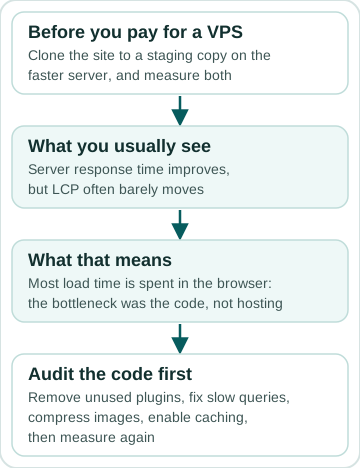
Test it before you pay for it: clone the site to a staging copy on the faster server and measure both. Server response time will usually improve, but LCP often barely moves, because most of the load time is spent in the browser rather than on the server. If that is what you see, hosting was never the bottleneck — the code was, and a faster server doesn't fix slow code.
The right fix: audit the code first. Remove unused plugins, fix the slow queries, compress images, enable caching — then measure again. A focused cleanup like this is a one-off piece of development work, and on a site whose problem is the code, it does more than any hosting upgrade, with nothing added to the monthly bill.
What "Good Enough" Code Actually Costs
An illustrative scenario — plug in your own numbers: you hire a freelancer to build a WordPress store for ₪3,500. It works, but it loads slowly. Say the slow site costs you ₪2,500 a month in lost sales; over a year, that is ₪30,000. Then you hire someone to fix it (₪2,500–₪5,000). The real cost of that ₪3,500 build is now ₪36,000–₪38,500.
The alternative: pay upfront for clean code, optimization and documentation. That quote will be higher than ₪3,500 — for published market ranges, see what a website costs in 2026 — but speed stops costing you sales from day one, and most of that ₪30,000 stays in the business.
FAQ
How do I know if my site has code issues or a hosting issue?
Run Google PageSpeed Insights (https://pagespeed.web.dev/) and read the performance findings under the score. If most of them point at the page itself — "Reduce unused JavaScript", "Render-blocking requests", "Improve image delivery", "Optimize DOM size" — it's the code. If the main finding is "Document request latency" (the server is slow to send the page), hosting may be part of it. Usually it's both — but start with the code.
Can I fix a "cheap build" myself?
Partially. You can remove unused plugins, reinstall your theme cleanly and compress images yourself with tools like Smush or ShortPixel. Database cleanup and query rewriting usually need a developer. A hybrid approach — you do the easy parts, a developer does the hard ones — costs a fraction of a rebuild and works well.
Sources
Related services
Related reading
November 2024 · 9 min
WordPress Speed Optimization: What to Fix First on Your Site, and How to Measure It
April 2026 · 7 min
8 Red Flags When Hiring a WordPress Developer (Before You Sign Anything)
May 2026 · 7 min
Elementor Performance: Fix the Real Problems, Not Just Symptoms
October 2026 · 13 min
WordPress Site Maintenance: What It Includes, What Breaks Without It, and How to Judge a Plan