8 Red Flags When Hiring a WordPress Developer (Before You Sign Anything)
By Daniel Mashkov, AI Systems ArchitectPublished 7 min read
TL;DR
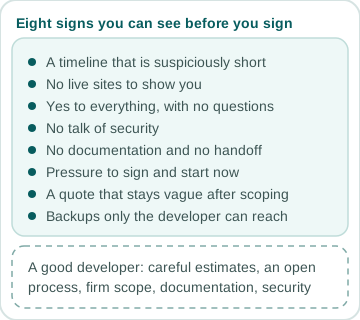
Every failed WordPress project leaves warning signs: vague estimates, no portfolio, over-confidence, no security posture, unwillingness to document, pressure to rush, opacity about costs, and solo freelancers with no backup plan. These eight signals are visible before you sign. Look for them in the first conversation.
Red Flag 1: "I Can Have It Done in Two Weeks"
A WordPress site with custom features, database design, and testing cannot be built in two weeks by one person (unless it is a minor reskin). If a developer gives you an estimate that is suspiciously short, they are either cutting corners, not understanding your requirements, or planning to add "change request" fees later (a classic bait-and-switch). Good developers ask clarifying questions first, then estimate.
Core Web Vitals — drag to test your scores
2.1s
Largest Contentful Paint
180ms
Interaction to Next Paint
0.06
Cumulative Layout Shift
Red Flag 2: No Portfolio (or a Thin One)
A developer with 3+ years of experience should have at least 3–5 live sites they can show you. Not concepts, not screenshots, but live WordPress sites. Ask to see them. Click through. If they say "my portfolio is in Dropbox" or "I signed an NDA and cannot show you," that is a bad sign — reputable clients allow portfolios (often anonymized). If the portfolio exists but all the sites look identical or amateur, that is another red flag.
Red Flag 3: Over-Confidence and No Pushback
If you pitch a feature and the developer says "yes, sure, no problem," without asking any questions, that is suspicious. Good developers push back: "That feature is expensive and slow. Here are three ways to do it better." If they agree to everything, they do not understand the complexity, or they are just taking your money and will blame you for scope creep later.
Red Flag 4: No Talk of Security
Ask: "How do you handle WordPress security updates? What about plugin security? Do you ever do a security audit?" If the developer says "WordPress is secure by default, you do not need to worry," they are not qualified. WordPress requires active maintenance: plugin updates, theme updates, regular backups, and regular security scans. A good developer includes this in the maintenance plan and can explain their patching schedule.
Red Flag 5: No Documentation or Design Handoff
After launch, do they provide documentation? A password manager, a list of plugins and versions, instructions for adding content, a log-in for the WordPress dashboard? If they say "just call me when you need help," that is a risk. You are now dependent on them. If they disappear (health, burnout, moving countries), you are stranded. Good developers leave behind a README, plugin list, and a handoff meeting.
Red Flag 6: Pressure to Rush or "Start Now"
If a developer pushes you to sign and start immediately without a clear written scope, contract, and timeline, walk away. "The sooner we start, the sooner it is done" is a sales tactic, not a technical necessity. Projects that rush usually end in overages, bugs, and disputes. A professional developer can wait for a signed contract.
Red Flag 7: Vague Pricing and Hidden Costs
For a defined project, a quote should be a single, clear number. "It depends" is a fair first answer before the scope is known — but once you have talked the project through, it should turn into a written number. Hourly billing is fine for open-ended work such as support or small fixes, as long as the rate and an hours estimate are agreed in advance. The red flag is a quote that stays vague after scoping, or one that leaves out hosting and maintenance costs. Vague pricing leads to disputes. A good developer gives you: (1) a fixed price for the agreed scope, (2) what is included, (3) what is not included (e.g., "stock photos, Stripe setup, custom SSL certificate" are extras), (4) payment terms (e.g., a deposit to start and the rest tied to milestones or delivery).
Red Flag 8: No Backup Plan or Disaster Recovery
Ask: "If you disappear, can someone else take over the site? Do you keep backups? Where are they stored?" If they say "it is all on my server" or "only I have access to the backups," that is a nightmare scenario. You do not own your website; they do. A good developer keeps backups on multiple services (AWS, Backblaze, local), provides you with access to hosting credentials, and has a handoff procedure if they leave.
FAQ
What if I have already hired someone and I see one of these red flags?
Do not wait. Address it immediately. If it is Flag 1 (unrealistic timeline), push back on scope or timeline in writing. If it is Flag 4 (no security plan), demand a maintenance agreement before launch. If it is Flags 5 or 8 (no documentation, no backups), make those non-negotiable requirements of payment. A developer who gets defensive about these questions is signaling that they do not take ownership seriously.
Are these red flags specific to WordPress, or do they apply to any developer?
These apply to any developer. If you are hiring someone for React, Next.js, or custom PHP, look for the same signals. The common theme: good developers are conservative in estimates, transparent in process, cautious about scope, and proactive about documentation and security. These are universal traits, not WordPress-specific.
Sources
Related services
Related reading
January 2025 · 4 min
The Hidden Cost of "Good Enough" WordPress Development
April 2026 · 5 min
Freelancer or Agency: The Honest Answer (From a Freelancer)
May 2026 · 6 min
How Much Should a Website Cost in 2026? Real Numbers
October 2026 · 10 min
Moving Off an Old ASP.NET or Umbraco Site: WordPress, a Modern Stack, or an Upgrade