LearnDash vs Teachable vs Kajabi: Honest Comparison From a WordPress Developer
By Daniel Mashkov, AI Systems ArchitectPublished Updated 8 min read
TL;DR
LearnDash runs on WordPress: you own the data, learners are unlimited, and you pay a flat annual license with no cut of your sales. Teachable and Kajabi are SaaS: they host everything for a monthly subscription — and on Teachable's entry plan, or on Kajabi with an outside payment gateway, they also take a percentage of each sale on top of card processing. Choose LearnDash for control and predictable costs; choose SaaS for "set it up and forget it" simplicity. This is the decision framework from someone who has built on all three.
Who owns your course content and student data?
LearnDash is a WordPress plugin. Your courses, student list, grades and payment history live in your own database, on hosting you control. You can export reports as CSV, and because it is your database, you can back up or move everything whenever you like. If you ever want to leave LearnDash (unlikely, but possible), your data comes with you.
With Teachable and Kajabi, the data lives on the platform. The content is yours and you can export student lists and sales records, but the school itself — the course player, progress history, automations and analytics — runs only there. Cancel the subscription and the school goes offline, so export before you leave. For Israeli course creators, it also means customer data is held by a foreign company, typically on US infrastructure — something to account for in your privacy policy.
Platform fee per sale, cheapest plan (lower = you keep more)
What will each platform actually cost you?
All prices here are in US dollars, from each vendor's own pricing page in October 2026 — they change often, so check before you decide. LearnDash: an annual license of $259 (Essentials), $399 (Pro) or $599 (Elite), with unlimited courses and learners and no revenue share. You keep every sale, minus your payment gateway's own fee. Add hosting and maintenance (see the FAQ below); even so, once a school has steady sales it is usually the cheapest of the three to run.
Teachable: Starter costs $39 a month ($29 billed annually) and takes a 7.5% transaction fee on every sale. Builder ($89 a month, or $69 billed annually) and Growth ($189, or $139 billed annually) take no transaction fee. On every plan, Teachable's own payment processing adds 2.9% + $0.30 per sale on US cards and 3.9% + $0.30 on international cards. Teachable Payments is available to creators based in Israel.
Kajabi: Basic costs $179 a month ($143 billed annually), Growth $249 ($199) and Pro $499 ($399). Kajabi takes no cut of sales that go through Kajabi Payments or PayPal. Kajabi's own processor, Kajabi Payments, charges 2.7%–2.9% + $0.30 per sale in the US depending on the plan, but it is offered only to businesses in a few regions — the US, Canada, the UK, select European countries, Australia and the UAE — not Israel. With a third-party payment provider other than PayPal, Kajabi adds its own fee on each sale: 2% on Basic, 1% on Growth, 0.5% on Pro, on top of what the provider charges.
Which is easiest to set up and maintain?
Teachable and Kajabi: a basic school can be live the same day. You upload a video, write a lesson description, set a price and publish. There is no technical maintenance on your side. The trade-off is flexibility: you work within the page templates, checkout and automations the platform gives you, and anything it doesn't offer is simply not there.
LearnDash: roughly 4–8 hours of setup if you're building on an existing WordPress site (design, plugin configuration). Starting from scratch, add roughly another 8–16 hours for WordPress itself, SSL, backups and security hardening. You also have to handle hosting, updates and plugin compatibility yourself. But once it's set up, you control the enrollment flow, email drip campaigns, gamification and the whole student experience.
Which handles advanced features and customization?
LearnDash on WordPress lets you add almost anything: Israeli payment gateways (sell the courses through WooCommerce with a local gateway such as Cardcom, Tranzila or Grow — including installment payments), member-only content, multilingual courses with WPML, lessons released on a schedule or after prerequisites, CRM integrations (Pipedrive, HubSpot) and automations through Make or Zapier.
Teachable and Kajabi both offer email sequences and basic integrations (Zapier, webhooks), but you work inside their platform. Want an enrollment flow or a local payment method the platform doesn't support? You adapt to the platform, not the other way round.
Which platform is right for you?
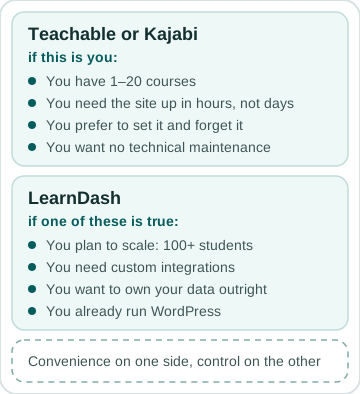
Choose Teachable/Kajabi if: you have 1–20 courses, you need the site up in hours (not days), and you prefer "set it and forget it." You're trading control for convenience.
Choose LearnDash if: you plan to scale (100+ students), you need custom integrations (CRM, email marketing, payment gateways), you want to own your data outright, or you already run WordPress and want to minimize platform lock-in. You trade convenience for control.
LearnDash vs Teachable vs Kajabi — at a glance
| Factor | LearnDash | Teachable | Kajabi |
|---|---|---|---|
| Model | WordPress plugin (self-hosted) | SaaS | SaaS |
| Data ownership | Yours — your own database | On the platform — export before you leave | On the platform — export before you leave |
| Base cost (Oct 2026) | $259–$599/yr license + hosting | From $29/mo (billed annually) | From $143/mo (billed annually) |
| Platform fee per sale | None (gateway fee only) | 7.5% on Starter, 0% on Builder and up (+ card processing) | None with Kajabi Payments or PayPal; 0.5%–2% with other gateways |
| Setup time | 4–8h (+8–16h from scratch) | Same day | Same day |
| Customization | Open — custom code, CRM, Israeli gateways | Within the platform's features | Within the platform's features |
| Maintenance | You handle hosting + updates | None | None |
| Best for | Scale (100+ students), control, owning your data | 1–20 courses, fast launch | 1–20 courses, fast launch |
FAQ
Can I migrate from Teachable/Kajabi to LearnDash later?
Yes, but it's work. You can export your course materials and student list from both platforms, then import them into LearnDash. Student progress and certificates won't migrate automatically — you'll recreate those in LearnDash. For a real school with several courses, expect tens of hours of setup and data mapping, not an afternoon.
Do I really need WordPress for LearnDash?
Yes. LearnDash is a plugin, not a standalone platform. You need WordPress hosting, a domain and an SSL certificate (included free with most modern hosts). Midrag's price guide puts hosting and a domain for a WordPress brochure site at ₪14–₪160 a month (checked October 2026); a fast setup for a course with video and many students sits at the top of that range or above it. All of that comes before the LearnDash license itself. Teachable and Kajabi need no infrastructure — they handle all of it.
Sources
Related services
Related reading
October 2026 · 9 min
Members Areas and Course Platforms: Custom Build vs LearnDash vs Tutor LMS
October 2026 · 16 min
A Members Area for Your Business: Membership Plugin, Hosted Platform or Custom Build
May 2026 · 6 min
How Much Should a Website Cost in 2026? Real Numbers
April 2026 · 5 min
Freelancer or Agency: The Honest Answer (From a Freelancer)