WooCommerce CRM Integration Guide for Israeli Stores 2026
By Daniel Mashkov, AI Systems ArchitectPublished Updated 7 min read
TL;DR
HubSpot and Zoho both have ready-made WooCommerce connectors, and both work for Israeli stores — with caveats. Zoho CRM has a full Hebrew interface and a free plan for up to three users; HubSpot has a free CRM tier and stronger reporting, but no Hebrew interface. Neither replaces your Israeli payment gateway (Cardcom, Tranzila) or your invoicing software for the 18% VAT — the CRM receives order data from WooCommerce. HubSpot scales with growing sales teams; Zoho fits cost-conscious SMBs. Setup via Zapier/Make, or custom webhooks for deeper data syncing (typically 3–5 days of developer work).
Why CRM Matters for Israeli E-commerce
An Israeli online store without a CRM is flying blind. Customer data lives in WooCommerce (orders, emails) and nowhere else. If a customer buys once and then contacts you via WhatsApp asking about a bulk order, there is no record of their history — no purchase volume, no payment history, no note-taking. A CRM centralizes customer data, payment history, and communication, so your sales team can close deals faster and your support team can resolve issues with context.
What an automation pipeline looks like
Trigger
WhatsApp / form / email
AI layer
understands intent
Route
Make.com / n8n
CRM + action
logged, replied, booked
HubSpot vs. Zoho: Feature Comparison
The two options I would compare first for a WooCommerce store in Israel:
- HubSpot: Full-featured CRM that connects to WooCommerce through ready-made apps in its marketplace. Pros: Beautiful interface, excellent reporting, scales with growing teams (10+ users). Cons: There is a free CRM tier, but paid sales seats get expensive as you grow — HubSpot's Sales Hub page (checked October 2026) lists Starter at $20 per seat/month when you pay monthly, less on an annual commitment, and Professional at $90–$100 per seat/month plus a one-time $1,500 onboarding fee. Best for: Growing e-commerce businesses, teams 3+. Hebrew support: No Hebrew interface (Hebrew is not one of HubSpot's display languages), though Hebrew text in records and emails works fine.
- Zoho: Lighter-weight CRM with step-by-step setup. Pros: Affordable — a free edition for up to three users, then four paid editions (Standard, Professional, Enterprise, Ultimate) priced per user; Zoho shows the prices in your local currency, so read them on its pricing page. Cons: Best suited to a small team (usually 1–5 people), reporting is less polished. Best for: Solopreneurs, small teams, cost-conscious SMBs. Hebrew support: Good — Hebrew is a fully supported interface language in Zoho CRM.
Setup: Zapier vs. Webhooks
Two paths:
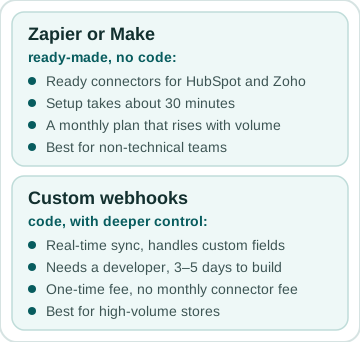
- Zapier/Make: Plug-and-play, no code. Zapier has pre-built connectors for both HubSpot and Zoho; on the WooCommerce side, Zapier needs the paid WooCommerce Zapier extension. When a WooCommerce order is placed, Zapier automatically creates a customer record in HubSpot/Zoho. Setup takes 30 minutes. Cost (checked October 2026): Zapier's Professional plan starts at $19.99/month billed annually or $29.99 month to month and rises with task volume, plus $129 a year for the extension. Best for: Non-technical teams who want fast setup.
- Custom Webhooks: Code-based syncing for deeper control. WooCommerce fires a webhook when an order is placed; your server listens and pushes the data to HubSpot/Zoho API. Pros: Real-time sync, zero Zapier fees, handles custom fields. Cons: Requires a developer, 3–5 days to build. Cost: a one-time development fee, set by how many fields and systems you map — and no monthly connector fee after it. Best for: High-volume stores, custom field mapping, teams with technical resources.
Israeli Payment Gateway & VAT Compliance
Cardcom and Tranzila are two of the most common Israeli payment gateways for online stores, and WooCommerce plugins exist for both. Not sure which gateway fits? The payment gateway picker narrows it down. Processing fees depend on your agreements with the gateway and the credit card companies, so compare quotes rather than relying on a headline rate. When syncing to CRM, ensure the CRM knows the payment method (credit card, direct debit, bank transfer) — different payment methods have different chargeback rates and payment terms. VAT is a separate job: Israeli stores charge 18% VAT (the rate since January 2025) and report it to the Tax Authority monthly or bi-monthly, depending on turnover. Tax invoices should come from an Israeli invoicing system connected to WooCommerce, not from the CRM — the CRM should receive the invoice details, not generate them.
Best Practices: Data Quality & Privacy
When syncing customer data to a CRM, hold two guardrails:
- Data validation: Do not sync incomplete records (no email, no phone). Bad data in the CRM means the sales team wastes time chasing dead leads.
- Consent and privacy: Israel's anti-spam law (section 30A of the Communications Law) requires prior explicit consent before you send advertising by email or SMS, with only a narrow exception for existing customers. The statute does not name WhatsApp, but Meta's own rules require an opt-in before a business messages anyone there, so treat it the same way. Capture consent with an unticked checkbox at WooCommerce checkout, and sync only consented customers to marketing segments in HubSpot/Zoho. Separately, the Privacy Protection Law governs how you store and secure that customer data.
FAQ
What if I already use a different CRM (Pipedrive, Monday)?
Zapier supports most CRMs. If Zapier has a connector, you can sync WooCommerce to any CRM without code. If not, a custom webhook can push data to any API (Pipedrive, Monday, Airtable, etc.). The rule that keeps this safe: whichever CRM you use, keep payments and invoicing in the systems built for them (your Israeli payment gateway and invoicing software) and send the results to the CRM. That way, switching CRMs never touches your tax setup. Before committing, check how well the CRM handles Hebrew — both the interface and right-to-left text in records and emails.
How often does data sync between WooCommerce and the CRM?
Zapier: with the WooCommerce Zapier extension, order triggers are instant, but the plugin queues them, so expect a delay of roughly 10 seconds to a minute. Zaps built on polling triggers check every 1–15 minutes, depending on your plan. Webhooks: instant (seconds). For most SMBs, a delay of a few minutes is fine — a customer order is reflected in the CRM within minutes. If you need the CRM updated within seconds, use direct webhooks.
Do I need a developer for this, or can I do it myself?
If you use Zapier, no developer needed. The setup is visual and point-and-click. If you want custom webhooks, you need a developer (PHP or Node.js). Most Israeli SMBs start with Zapier (quick, affordable) and upgrade to custom webhooks later as the business scales and data needs grow more complex.
Sources
- HubSpot — Sales Hub pricing (checked October 2026)
- HubSpot — language offerings: Hebrew is not an in-app interface language (checked October 2026)
- Zoho CRM — pricing and editions; free edition for 3 users (checked October 2026)
- Zoho CRM — specifications: supported languages include Hebrew (checked October 2026)
- Zapier — plans and pricing (checked October 2026)
- WooCommerce Marketplace — Zapier Integration for WooCommerce, by Tectalic (checked October 2026)
- Tectalic — Zapier Integration for WooCommerce troubleshooting: typical trigger delay (checked October 2026)
- Meta — getting opt-in for WhatsApp business messaging (checked October 2026)