Interaction to Next Paint (INP): How to Fix It in WordPress
By Daniel Mashkov, AI Systems ArchitectPublished Updated 6 min read
TL;DR
INP (Interaction to Next Paint) replaced First Input Delay (FID) as a Core Web Vital on 12 March 2024. When a WordPress site fails it, the usual cause is heavy plugin JavaScript blocking the main thread when users click buttons or fill in forms — not server speed. The fix: audit what each plugin loads, defer non-critical JavaScript, and replace heavy jQuery plugins with modern lightweight alternatives.
What INP Measures (And Why WordPress Fails)
INP measures the time from when a user clicks a button (or types in a form field) until the browser displays the response — a visual update, a menu opening, a form error, anything. Most WordPress sites fail INP not because the server is slow, but because the browser's main thread is blocked by JavaScript. A user clicks "Add to Cart," but three plugins are running event listeners, animations, and analytics code simultaneously. The browser cannot respond for 500–1000ms (or worse), and the page feels sluggish.
WordPress loads plugins in order, and most plugins do not use code splitting or lazy loading. A single heavy plugin (like some page builders, form plugins, or marketing automation integrations) can add hundreds of kilobytes of JavaScript that runs on every page, on every interaction, consuming main-thread time.
Core Web Vitals — drag to test your scores
2.1s
Largest Contentful Paint
180ms
Interaction to Next Paint
0.06
Cumulative Layout Shift
The Plugin Audit: Where the Time Is Going
Start here: open your site in Chrome DevTools (F12), go to Lighthouse, run a Performance audit. Scroll to "Reduce unused JavaScript" — if more than 50% of your JS is flagged as unused, you have a bloat problem. Next, go to the Network tab, sort by script size, and see which .js files are being loaded. Scripts from plugins like Elementor, Gravity Forms, WooCommerce add-ons, and ad networks often dwarf your core site script.
Then, ask hard questions: Does this plugin run on every page, or just a few? Can I defer loading it (async, defer, or load-on-demand)? Is there a lighter alternative? An example: Contact Form 7 loads its scripts and styles on every page by default — if your only form is on the contact page, there is no reason to load them on your homepage. Load each plugin's assets only on the pages that actually use it (conditional loading), with a few lines of code or an asset-manager plugin such as Perfmatters or Asset CleanUp.
Deferring and Async Loading
Scripts enqueued without options land in the <head>, where they block rendering and compete with your first interactions. When you enqueue a script with wp_enqueue_script(), pass in_footer so it moves to the end of the <body>, and — since WordPress 6.3 — a strategy of defer (or async for fully independent scripts such as analytics or a chat widget). Deferred scripts download in parallel and run after the HTML is parsed, so the main thread is free sooner.
Critical fix for many WordPress sites: delay non-essential scripts — chat widgets, pop-ups, marketing trackers — until the user's first interaction, and initialize jQuery plugins only when the user scrolls to the element that needs them. One caveat: whatever you delay runs at the moment of that first interaction, so never delay a script the first click itself depends on — you would only move the lag onto that click. Done carefully, this technique alone can cut INP sharply on slow phones.
Replacing Heavy Plugins with Lightweight Alternatives
Some WordPress plugins are legacy codebases built before performance was a priority. Page builders like Elementor add their own layer of JavaScript and CSS to every page built with them — noticeably more than the same layout built with native WordPress blocks on a lightweight theme such as Blocksy or GeneratePress. Ad networks and chat widgets often have bloated SDKs. Consider: Do I still need those WooCommerce add-ons from 2015, or has WooCommerce itself (or one modern plugin) replaced them?
For forms: feature-rich form plugins load heavy, often jQuery-dependent scripts. A lighter form plugin, or a plain HTML form that posts to an automation (via Zapier or Make), covers most SMB needs with a fraction of the code. For images: optimization belongs at upload time or on the server (Imagify, ShortPixel, or your host's image CDN), not in front-end JavaScript — and WordPress has added loading="lazy" to images natively since version 5.5, so a separate JavaScript lazy-load script is usually redundant. For sliders: replace Slider Revolution with a lighter library such as Swiper, or a CSS scroll-snap carousel that needs no JavaScript at all.
Measuring INP: How to Know You Fixed It
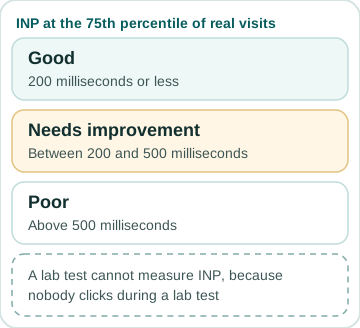
Use Google PageSpeed Insights (https://pagespeed.web.dev/) to check INP. Google rates an INP of 200ms or less as "good", 200–500ms as "needs improvement", and above 500ms as "poor" — measured at the 75th percentile of real visits. That number comes from the field data at the top of the report (the Chrome User Experience Report), which only appears once a site has enough real traffic. The Lighthouse lab score below it cannot measure INP at all, because nobody clicks during a lab test; its closest stand-in is Total Blocking Time. Real users on mid-range phones tell the real story, not your fast dev machine.
Set up Web Vitals monitoring (via Sentry, Google's web-vitals library, or the Core Web Vitals report in Google Search Console) to track real-user INP over time. A single audit is a snapshot; continuous monitoring shows whether your fix stuck or if new plugins re-introduced the problem.
FAQ
How is INP calculated?
The browser times every click, tap and key press on the page. Each interaction's latency runs from the input until the next frame is painted, in three parts: input delay (waiting for the main thread), processing time (your event handlers) and presentation delay (rendering the result). The page's INP is its slowest interaction — except that on pages with many interactions, in web.dev's words, "we ignore one highest interaction for every 50 interactions" to drop outliers. Google then takes the 75th percentile of real visits: 200 milliseconds or less is good, above 500 is poor. Scrolling and hovering do not count.
If I disable all plugins, INP goes down. Should I remove all of them?
No. Disable them one at a time and re-test after each: open the Performance panel in Chrome DevTools, which shows your INP live as you click and type, and repeat the same interactions every time (a standard Lighthouse report cannot measure INP). You will usually find that most plugins have little effect on INP, and a handful of heavy ones are the culprits. Keep the essential ones, remove the luxury ones. A plugin that adds a chat widget is nice; a plugin that adds 2MB of unused code is not.
Does INP only matter for clicks? What about form typing?
INP measures clicks, taps, and key presses — on a physical or on-screen keyboard. (Hovering and scrolling do not count.) A form field that lags when you type in it (e.g., 300ms delay before a character appears) is an INP failure. This often happens when auto-save, validation, or analytics listeners block the main thread. The fix is the same: defer or remove the heavy listeners.
Can I hire someone to fix INP for me?
Yes. A WordPress performance specialist can run the audits, recommend plugin replacements, and handle the code changes — on a small site that is usually a few hours to a day of work, and the price depends mostly on how many plugins and templates are involved. The payoff is practical: a store that responds instantly to "Add to Cart" and to typing in the checkout form loses fewer buyers along the way. Measure your own conversion rate before and after the fix rather than trusting a generic percentage. This kind of fix is part of my WordPress development and speed work, with a fixed quote after a short look at the site. To see where your own site stands first, run it through the performance checklist.
Sources
- Google web.dev — Interaction to Next Paint (checked October 2026)
- web.dev — Interaction to Next Paint becomes a Core Web Vital on March 12 (checked October 2026)
- Make WordPress Core — Registering scripts with async and defer attributes in WordPress 6.3 (checked October 2026)
- Make WordPress Core — Lazy-loading images in 5.5 (checked October 2026)
- Chrome DevTools — Performance panel: live Core Web Vitals, including INP (checked October 2026)
- PageSpeed Insights